What We Are Building in Part 5
The storefront, checkout, and synchronization layers now work. Part 5 turns the underlying functions into practical private tools that make the store easier to operate.
Product Management
- Add and edit products
- Manage descriptions and SEO
- Control categories and collections
- Activate or deactivate listings
Pricing Tools
- Bulk retail-price changes
- Profit and margin calculations
- Variant price updates
- Preview before commit
Image Workflows
- Upload and organize artwork
- Generate web copies
- Rename mockups consistently
- Download external images
Automation
- Printify synchronization
- Shopify variant matching
- Review moderation
- Python batch processing
A task is a good automation candidate when it follows clear rules, happens often, and creates avoidable errors when performed manually.
The Admin System I Actually Use
This is the administration page I built for The Conspiracy Shirt Company. It started as a basic form for adding products and gradually grew into the operational center of the store.
The page now combines product editing, platform integrations, pricing, advertising controls, database utilities, and repetitive store maintenance in one protected area.
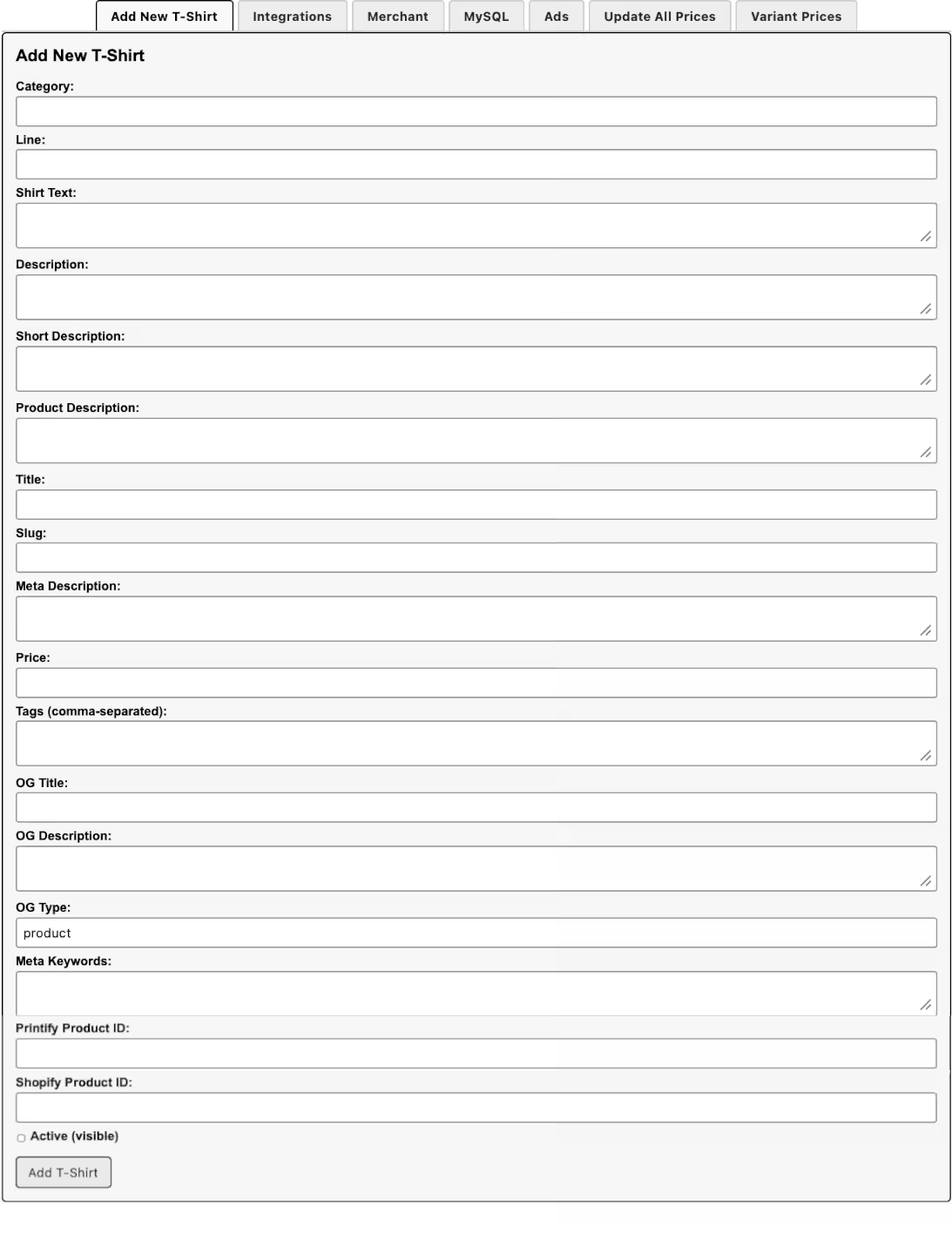
Add and Edit Shirts
The form manages the category, product line, artwork text, descriptions, product copy, title, slug, price, tags, SEO, Open Graph fields, platform IDs, and visibility.
Manage Integrations
Separate controls synchronize Printify products, retrieve Shopify product IDs, update Shopify products, and run the Google Merchant product feed.
Update Retail and Variant Prices
Prices can be updated using a fixed retail price, target profit percentage, or target profit amount. Individual variants can also be filtered, selected, previewed, and updated.
Duplicate Existing Products
Existing shirt records can be duplicated into other garment types while preserving the design copy and generating a new title, category, product description, and unique slug.
Run Store Utilities
The private tools include controlled SQL utilities for repairing variant titles, resetting product lines, and performing other database maintenance.
Review Operational Data
Product records display item numbers, likes, purchase clicks, active status, platform mappings, and the controls needed to continue the product workflow.
I did not design every tool before launching the store. Each section was added after a recurring task became slow, repetitive, or easy to get wrong. That is the same approach used throughout this chapter.
Contents
- Admin architecture
- Protect the admin area
- Add role-based authorization
- Build the dashboard
- Build the product-management list
- Build the product editor
- Validate product changes
- Record an audit log
- Build a bulk-price tool
- Preview pricing changes
- Build synchronization controls
- Prevent duplicate jobs
- Manage customer reviews
- Build an image manager
- Use Python for image batches
- Download product images with Python
- Track automation jobs
- Part 5 checklist
- Frequently asked questions
Admin Architecture
/admin/
products.php
bulk-pricing.php
sync-printify.php
MySQL
Shopify API
Printify API
Admin Pages Should Never Be Public Utilities
They can change prices, publish products, alter availability, moderate reviews, and call private APIs. Every request must be authenticated and authorized.
Protect the Admin Area
Create one reusable authentication guard and include it at the top of every private administration page.
<?php
/**
 * /admin/includes/admin-auth.php
 */

declare(strict_types=1);

function requireAdmin(): void
{
    if (session_status() === PHP_SESSION_NONE) {
        session_start();
    }

    $userId = $_SESSION['user_id'] ?? null;
    $role   = $_SESSION['user_role'] ?? null;

    if (!$userId || $role !== 'admin') {
        $_SESSION['return_to'] =
            $_SERVER['REQUEST_URI'] ?? '/admin/';

        header(
            'Location: /login.php',
            true,
            302
        );

        exit;
    }

    $lastActivity = (int) (
        $_SESSION['last_activity'] ?? 0
    );

    if (
        $lastActivity > 0 &&
        time() - $lastActivity > 1800
    ) {
        session_unset();
        session_destroy();

        header(
            'Location: /login.php?expired=1',
            true,
            302
        );

        exit;
    }

    $_SESSION['last_activity'] = time();
}
Add Role-Based Authorization
Authentication confirms who the user is. Authorization decides which actions that user may perform.
<?php

function adminCan(string $permission): bool
{
    $permissions = $_SESSION['permissions'] ?? [];

    return in_array(
        $permission,
        $permissions,
        true
    );
}

function requirePermission(
    string $permission
): void {
    if (!adminCan($permission)) {
        http_response_code(403);
        exit('You do not have permission to perform this action.');
    }
}| Permission | Example Use |
|---|---|
products.edit |
Edit titles, descriptions, and collections |
prices.bulk |
Run bulk price changes |
printify.sync |
Start Printify synchronization |
reviews.moderate |
Approve or reject reviews |
Build the Admin Dashboard
The dashboard should summarize work that requires attention rather than becoming another decorative home page.
<?php

$dashboard = [
    'active_products' => (int) $pdo->query("
        SELECT COUNT(*)
        FROM shirts
        WHERE active = 1
    ")->fetchColumn(),

    'inactive_products' => (int) $pdo->query("
        SELECT COUNT(*)
        FROM shirts
        WHERE active = 0
    ")->fetchColumn(),

    'unavailable_variants' => (int) $pdo->query("
        SELECT COUNT(*)
        FROM shirt_variants
        WHERE enabled = 1
          AND available = 0
    ")->fetchColumn(),

    'pending_reviews' => (int) $pdo->query("
        SELECT COUNT(*)
        FROM reviews
        WHERE approved = 0
    ")->fetchColumn(),
];
Build the Product-Management List
The product list should support search, filtering, status controls, and links to the product editor.
<?php

$search = trim(
    (string) ($_GET['q'] ?? '')
);

$status = (string) (
    $_GET['status'] ?? 'all'
);

$where = [];
$params = [];

if ($search !== '') {
    $where[] = "(
        s.title LIKE :search
        OR CAST(s.item_number AS CHAR)
            LIKE :search
        OR s.line LIKE :search
    )";

    $params[':search'] =
        '%' . $search . '%';
}

if ($status === 'active') {
    $where[] = 's.active = 1';
}

if ($status === 'inactive') {
    $where[] = 's.active = 0';
}

$sql = "
    SELECT
        s.id,
        s.item_number,
        s.title,
        s.line,
        s.category,
        s.price,
        s.active,
        s.printify_product_id,
        s.shopify_product_id,
        s.updated_at,
        COUNT(sv.id) AS variant_count
    FROM shirts AS s
    LEFT JOIN shirt_variants AS sv
        ON sv.shirt_id = s.id
";

if ($where) {
    $sql .= ' WHERE ' .
        implode(' AND ', $where);
}

$sql .= "
    GROUP BY s.id
    ORDER BY s.item_number DESC
    LIMIT 100
";

$stmt = $pdo->prepare($sql);
$stmt->execute($params);

$products = $stmt->fetchAll();
Build the Product Editor
Use one form for fields managed locally and show external platform IDs as read-only operational data.
<form method="post"
      class="admin-product-form">

    <input type="hidden"
           name="csrf_token"
           value="<?= htmlspecialchars(
               $_SESSION['admin_csrf_token'],
               ENT_QUOTES,
               'UTF-8'
           ) ?>">

    <input type="hidden"
           name="product_id"
           value="<?= (int) $product['id'] ?>">

    <label>
        Product title

        <input type="text"
               name="title"
               maxlength="255"
               required
               value="<?= htmlspecialchars(
                   $product['title'],
                   ENT_QUOTES,
                   'UTF-8'
               ) ?>">
    </label>

    <label>
        Collection

        <input type="text"
               name="line"
               maxlength="150"
               value="<?= htmlspecialchars(
                   $product['line'] ?? '',
                   ENT_QUOTES,
                   'UTF-8'
               ) ?>">
    </label>

    <label>
        Short description

        <input type="text"
               name="short_description"
               maxlength="255"
               value="<?= htmlspecialchars(
                   $product['short_description'] ?? '',
                   ENT_QUOTES,
                   'UTF-8'
               ) ?>">
    </label>

    <label>
        Full description

        <textarea name="description"
                  rows="12"><?=
            htmlspecialchars(
                $product['description'] ?? '',
                ENT_QUOTES,
                'UTF-8'
            )
        ?></textarea>
    </label>

    <label>
        Meta description

        <textarea name="meta_description"
                  maxlength="320"
                  rows="4"><?=
            htmlspecialchars(
                $product['meta_description'] ?? '',
                ENT_QUOTES,
                'UTF-8'
            )
        ?></textarea>
    </label>

    <label>
        <input type="checkbox"
               name="active"
               value="1"
               <?= $product['active']
                   ? 'checked'
                   : '' ?>>

        Active
    </label>

    <button type="submit">
        Save Product
    </button>
</form>
Validate Product Changes
<?php

function validateProductInput(
    array $input
): array {
    $errors = [];

    $title = trim(
        (string) ($input['title'] ?? '')
    );

    if ($title === '') {
        $errors['title'] =
            'The product title is required.';
    }

    if (mb_strlen($title) > 255) {
        $errors['title'] =
            'The product title is too long.';
    }

    $shortDescription = trim(
        (string) (
            $input['short_description'] ?? ''
        )
    );

    if (
        mb_strlen($shortDescription) > 255
    ) {
        $errors['short_description'] =
            'The short description is too long.';
    }

    $metaDescription = trim(
        (string) (
            $input['meta_description'] ?? ''
        )
    );

    if (mb_strlen($metaDescription) > 320) {
        $errors['meta_description'] =
            'The meta description is too long.';
    }

    return [
        'errors' => $errors,
        'data' => [
            'title' => $title,
            'line' => trim(
                (string) ($input['line'] ?? '')
            ),
            'short_description' =>
                $shortDescription,
            'description' => trim(
                (string) (
                    $input['description'] ?? ''
                )
            ),
            'meta_description' =>
                $metaDescription,
            'active' =>
                isset($input['active']) ? 1 : 0,
        ],
    ];
}
Record an Audit Log
CREATE TABLE admin_audit_log (
    id BIGINT UNSIGNED AUTO_INCREMENT PRIMARY KEY,

    admin_user_id BIGINT UNSIGNED NOT NULL,

    action VARCHAR(100) NOT NULL,
    entity_type VARCHAR(100) NOT NULL,
    entity_id VARCHAR(150) DEFAULT NULL,

    before_data JSON DEFAULT NULL,
    after_data JSON DEFAULT NULL,

    ip_address VARCHAR(45) DEFAULT NULL,
    created_at DATETIME NOT NULL,

    KEY idx_admin_audit_user (
        admin_user_id
    ),

    KEY idx_admin_audit_entity (
        entity_type,
        entity_id
    ),

    KEY idx_admin_audit_created (
        created_at
    )
) ENGINE=InnoDB
  DEFAULT CHARSET=utf8mb4
COLLATE=utf8mb4_unicode_ci;<?php
function recordAdminAction(
PDO $pdo,
int $adminUserId,
string $action,
string $entityType,
string|int|null $entityId,
?array $before,
?array $after
): void {
$stmt = $pdo->prepare("
INSERT INTO admin_audit_log (
admin_user_id,
action,
entity_type,
entity_id,
before_data,
after_data,
ip_address,
created_at
) VALUES (
:admin_user_id,
:action,
:entity_type,
:entity_id,
:before_data,
:after_data,
:ip_address,
UTC_TIMESTAMP()
)
");
$stmt->execute([
':admin_user_id' => $adminUserId,
':action' => $action,
':entity_type' => $entityType,
':entity_id' => $entityId,
':before_data' => $before
? json_encode(
$before,
JSON_THROW_ON_ERROR
)
: null,
':after_data' => $after
? json_encode(
$after,
JSON_THROW_ON_ERROR
)
: null,
':ip_address' =>
$_SERVER['REMOTE_ADDR'] ?? null,
]);
}Build a Bulk-Price Tool
Bulk pricing should support fixed prices, percentage changes, and size-specific rules without editing each variant manually.
<?php

function calculateNewPrice(
    float $currentPrice,
    string $mode,
    float $value
): float {
    $newPrice = match ($mode) {
        'fixed' => $value,

        'increase_percent' =>
            $currentPrice * (1 + $value / 100),

        'decrease_percent' =>
            $currentPrice * (1 - $value / 100),

        'increase_amount' =>
            $currentPrice + $value,

        'decrease_amount' =>
            $currentPrice - $value,

        default => throw new InvalidArgumentException(
            'Unknown pricing mode.'
        ),
    };

    if ($newPrice < 1 || $newPrice > 500) {
        throw new InvalidArgumentException(
            'The calculated price is outside the allowed range.'
        );
    }

    return round($newPrice, 2);
}
Preview Pricing Changes Before Committing
<?php

$previewStmt = $pdo->prepare("
    SELECT
        sv.id,
        s.item_number,
        s.title,
        sv.color,
        sv.size,
        sv.price
    FROM shirt_variants AS sv
    INNER JOIN shirts AS s
        ON s.id = sv.shirt_id
    WHERE s.active = 1
      AND (:line = '' OR s.line = :line)
    ORDER BY
        s.item_number DESC,
        sv.color,
        sv.size
");

$previewStmt->execute([
    ':line' => $line,
]);

$previewRows = [];

foreach ($previewStmt->fetchAll() as $row) {
    $newPrice = calculateNewPrice(
        (float) $row['price'],
        $mode,
        $value
    );

    $previewRows[] = [
        ...$row,
        'new_price' => $newPrice,
        'change' => round(
            $newPrice - (float) $row['price'],
            2
        ),
    ];
}Build Synchronization Controls
Without Admin Tools
- Open Printify
- Copy product IDs
- Copy variant IDs
- Edit database records
- Download images
- Update availability
With Sync Controls
- Select one product or the full catalog
- Run the synchronization
- Review inserted and updated counts
- Inspect warnings
- Approve any risky changes
Prevent Duplicate Jobs
<?php

function acquireJobLock(
    PDO $pdo,
    string $lockName,
    int $timeoutSeconds = 0
): bool {
    $stmt = $pdo->prepare("
        SELECT GET_LOCK(
            :lock_name,
            :timeout_seconds
        )
    ");

    $stmt->bindValue(
        ':lock_name',
        $lockName,
        PDO::PARAM_STR
    );

    $stmt->bindValue(
        ':timeout_seconds',
        $timeoutSeconds,
        PDO::PARAM_INT
    );

    $stmt->execute();

    return (int) $stmt->fetchColumn() === 1;
}

function releaseJobLock(
    PDO $pdo,
    string $lockName
): void {
    $stmt = $pdo->prepare("
        SELECT RELEASE_LOCK(:lock_name)
    ");

    $stmt->execute([
        ':lock_name' => $lockName,
    ]);
}
Manage Customer Reviews
Keep new reviews in a moderation queue and use explicit approve, reject, and delete actions.
<?php

function moderateReview(
    PDO $pdo,
    int $reviewId,
    string $action
): void {
    if (!in_array(
        $action,
        ['approve', 'reject', 'delete'],
        true
    )) {
        throw new InvalidArgumentException(
            'Unknown review action.'
        );
    }

    if ($action === 'delete') {
        $stmt = $pdo->prepare("
            DELETE FROM reviews
            WHERE id = :review_id
        ");
    } else {
        $approved = $action === 'approve'
            ? 1
            : 0;

        $stmt = $pdo->prepare("
            UPDATE reviews
            SET approved = :approved
            WHERE id = :review_id
        ");

        $stmt->bindValue(
            ':approved',
            $approved,
            PDO::PARAM_INT
        );
    }

    $stmt->bindValue(
        ':review_id',
        $reviewId,
        PDO::PARAM_INT
    );

    $stmt->execute();
}
Build an Image Manager
Upload Artwork
Validate file type, MIME type, dimensions, file size, and image decoding before accepting an upload.
Use Predictable Folders
Store files under a stable item number with consistent front, back, sleeve, and design filenames.
Create Web Copies
Keep production artwork untouched and generate smaller storefront copies separately.
Store Image Records
Record source, position, color, dimensions, sort order, and whether the image is the default.
Use Python for Image Batches
Local Python scripts are useful when hundreds of files need the same resizing, compression, sharpening, or format conversion.
from pathlib import Path
from PIL import Image, ImageEnhance

SOURCE_DIR = Path("source-images")
OUTPUT_DIR = Path("web-images")
MAX_SIZE = (1800, 1800)
JPEG_QUALITY = 86

OUTPUT_DIR.mkdir(
    parents=True,
    exist_ok=True
)

supported = {
    ".jpg",
    ".jpeg",
    ".png",
    ".webp"
}

for source_path in SOURCE_DIR.rglob("*"):
    if source_path.suffix.lower() not in supported:
        continue

    relative_path = source_path.relative_to(
        SOURCE_DIR
    )

    output_path = (
        OUTPUT_DIR /
        relative_path
    ).with_suffix(".webp")

    output_path.parent.mkdir(
        parents=True,
        exist_ok=True
    )

    try:
        with Image.open(source_path) as image:
            image.load()

            if image.mode not in {"RGB", "RGBA"}:
                image = image.convert("RGBA")

            image.thumbnail(
                MAX_SIZE,
                Image.Resampling.LANCZOS
            )

            image = ImageEnhance.Sharpness(
                image
            ).enhance(1.08)

            image.save(
                output_path,
                "WEBP",
                quality=JPEG_QUALITY,
                method=6
            )

            print(
                f"Created: {output_path}"
            )
    except Exception as error:
        print(
            f"Failed: {source_path} - {error}"
        )
Download Product Images with Python
from pathlib import Path
from urllib.parse import urlparse
import requests

TIMEOUT = 30
OUTPUT_DIR = Path("downloaded-product-images")

OUTPUT_DIR.mkdir(
    parents=True,
    exist_ok=True
)

def download_image(
    url: str,
    item_number: int,
    position: str,
    index: int
) -> Path:
    parsed = urlparse(url)
    suffix = Path(parsed.path).suffix or ".jpg"

    safe_position = "".join(
        character
        for character in position
        if character.isalnum()
        or character in {" ", "-", "_"}
    ).strip()

    product_dir = OUTPUT_DIR / str(item_number)

    product_dir.mkdir(
        parents=True,
        exist_ok=True
    )

    output_path = product_dir / (
        f"{index:02d}-{safe_position}{suffix}"
    )

    response = requests.get(
        url,
        timeout=TIMEOUT
    )

    response.raise_for_status()

    output_path.write_bytes(
        response.content
    )

    return output_path
Track Automation Jobs
CREATE TABLE automation_jobs (
    id BIGINT UNSIGNED AUTO_INCREMENT PRIMARY KEY,

    job_type VARCHAR(100) NOT NULL,
    status VARCHAR(30) NOT NULL,

    requested_by BIGINT UNSIGNED DEFAULT NULL,

    payload JSON DEFAULT NULL,
    result JSON DEFAULT NULL,
    error_message TEXT DEFAULT NULL,

    started_at DATETIME DEFAULT NULL,
    finished_at DATETIME DEFAULT NULL,
    created_at DATETIME NOT NULL,

    KEY idx_automation_job_type (
        job_type
    ),

    KEY idx_automation_status (
        status
    ),

    KEY idx_automation_created (
        created_at
    )
) ENGINE=InnoDB
  DEFAULT CHARSET=utf8mb4
COLLATE=utf8mb4_unicode_ci;I built a tool whenever I caught myself doing the same tedious task repeatedly.
Part 5 Admin and Automation Checklist
- Every admin page requires authentication.
- Sensitive actions require explicit permissions.
- Admin sessions expire after inactivity.
- State-changing forms use CSRF protection.
- Product forms validate all submitted values.
- External platform IDs are not edited casually.
- Important changes are recorded in an audit log.
- The product list supports search and status filters.
- Bulk changes provide a preview before commit.
- Bulk updates use database transactions.
- Pricing tools enforce reasonable minimum and maximum values.
- Synchronization tools show the selected shop and last run.
- Long-running jobs use a lock.
- One failed API operation does not expose private data.
- Review moderation uses approve, reject, and delete actions.
- Uploaded images are validated before storage.
- Production masters remain separate from web copies.
- Image filenames and folders follow a predictable convention.
- Python scripts include timeouts and error handling.
- Automation jobs record start, finish, status, and errors.
- Dangerous actions require deliberate confirmation.
- Backups exist before large bulk operations.
- Admin tools are tested with realistic product data.
Admin Tools and Store Automation FAQ
Why build custom admin tools instead of editing the database directly?
Custom admin pages reduce mistakes by validating fields, limiting available actions, preserving relationships, recording changes, and presenting the data in a workflow designed for the store.
Should admin pages be inside public_html?
They can be stored under public_html when they are protected by strong authentication, authorization, CSRF protection, secure sessions, HTTPS, and server rules. Sensitive configuration should still remain outside the public web root.
What is the safest way to perform bulk price changes?
Preview the affected products and variants first, use a transaction, validate minimum and maximum prices, record the old and new values, and require a confirmation token before committing the update.
Should an admin tool call Shopify and Printify directly?
The admin page should call private server-side service functions. API tokens and detailed responses should remain in private PHP files and logs rather than being exposed to browser JavaScript.
Why use Python when the store is built in PHP?
PHP is ideal for browser-based administration and database-backed workflows. Python is useful for local batch image processing, file renaming, downloads, compression, reporting, and other long-running desktop scripts.
How should product images be organized?
Use predictable folders and filenames tied to a stable product identifier. Store image metadata in the database when positions, colors, sources, or sort order need to be managed independently.
Should reviews appear immediately after submission?
A moderation queue is safer. New reviews can remain unapproved until an administrator verifies that they are relevant, appropriate, and not spam.
How do I prevent the same automation from running twice?
Use a lock file, database lock row, job status record, or advisory lock. The tool should detect an active job and refuse to start another conflicting process.
What should be included in an audit log?
Record the administrator, action, entity type, entity ID, timestamp, request IP, and a structured summary of important before-and-after values.
Which tasks should be automated first?
Automate tasks that are frequent, repetitive, error-prone, measurable, and based on clear rules. Product synchronization, image preparation, bulk pricing, exports, and availability checks are strong early candidates.
Continue to Part 6
The store now has private tools for product management, pricing, synchronization, images, reviews, and automation. Part 6 focuses on testing, security, performance, SEO, backups, monitoring, and launch.